Think of this table as a checklist. Each row is a class of situation the topic can throw at you; the last column names the example that clears it.
#
Case class
What makes it tricky
Covered by
C1
1:1 relationship
FK can go either side; needs UNIQUE
Ex 1
C2
1:N relationship
FK forced onto the many side
Ex 2
C3
M:N relationship
no single FK works → junction table
Ex 3
C4
Counting bound (max pairs)
which side restricts reuse?
Ex 4
C5
Zero / partial participation
an instance with no partner
Ex 5
C6
Degenerate: self / recursive relationship
entity relates to itself
Ex 6
C7
Multivalued attribute
one attribute, many values → own table
Ex 7
C8
Real-world word problem
translate English → full ER + tables
Ex 8
C9
Exam twist: cardinality vs participation
independent axes confused
Ex 9
C10
Limiting behaviour (M:N with a bound on one side)
when M:N collapses toward 1:N
Ex 10
Prerequisites we lean on: Primary keys and Foreign keys, Relational Model — tables, keys, foreign keys, and for the "why 1NF" arguments, Normalization — 1NF, 2NF, 3NF.
Forecast: guess now — does the FK go on Person, Passport, or both? What column property makes it truly 1:1?
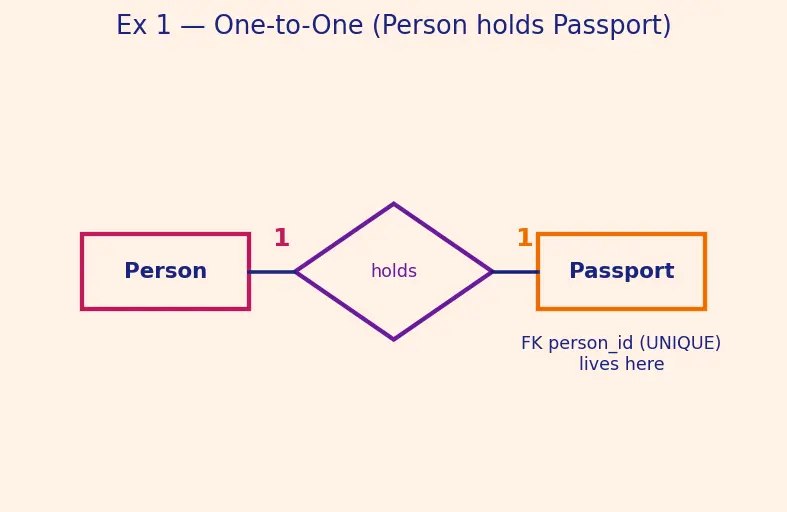
Draw the ER fragment. Two rectangles Person and Passport, a diamond holds between them, with a 1 written on each edge.
Why this step? Cardinality is a property of the relationship, so we must picture the diamond and its edge numbers before touching tables.
Figure s01 (described): the magenta Person rectangle on the left, an orange Passport rectangle on the right, joined through a violet holds diamond in the middle. A bold 1 sits on the edge to Person and another bold 1 on the edge to Passport — that pair of ones is what "one-to-one" means. A caption under Passport notes that the FK person_id (UNIQUE) lives on that side.
Pick the FK side. Put person_id inside Passport. Add UNIQUE to it.
Why this step? In 1:1 either side could host the FK, but a passport cannot exist without an owner (total participation on Passport), so hosting the link on the side that must participate avoids NULLs. UNIQUE forbids two passports pointing at the same person → enforces the "one" on the person side.
Write it.Passport(passport_no PK, person_id FK UNIQUE)Why this step?UNIQUE + being an FK together squeeze the ratio: FK-ness gives "each passport → one person", UNIQUE gives "each person → at most one passport". Both bounds = 1:1.
Verify: if we tried to give the second passport to person 7, the UNIQUE(person_id) constraint rejects the insert. Ratio holds. ✔
Forecast: FK on Employee or on Department? What breaks with the wrong choice?
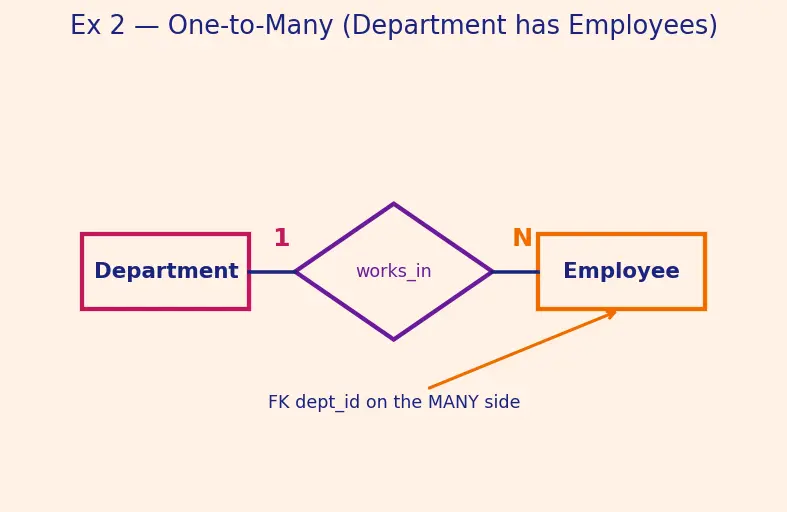
Mark the edges. Diamond works_in; edge to Department = 1, edge to Employee = N.
Why this step? The N marks the "many" side — the memorised rule "FK lives on the Many side" keys off exactly this letter.
Figure s02 (described): the magenta Department rectangle links through a violet works_in diamond to the orange Employee rectangle. A bold 1 sits on the Department edge, a bold N on the Employee edge. An orange arrow points from below up to Employee with the note "FK dept_id on the MANY side" — the picture of the placement rule.
Put the FK on the many side.Employee gets dept_id.
Why this step? Each employee has one department → a single column can hold it. One value per row is exactly what a relational column allows.
Show why the reverse fails. If we tried to store employees insideDepartment, we'd need a column holding a list like "5,7,9".
Why this step? A cell holding many values violates 1NF (see Normalization — 1NF, 2NF, 3NF), and you can't index or join on it. The 1:N structure forbids that placement.
Employee(emp_id PK, dept_id FK)
Verify: with 3 departments and 10 employees, every employee row carries exactly one dept_id; no list-cells exist. Max pairs = 10 (see Ex 4). ✔
Forecast: what new table appears, and what is its key?
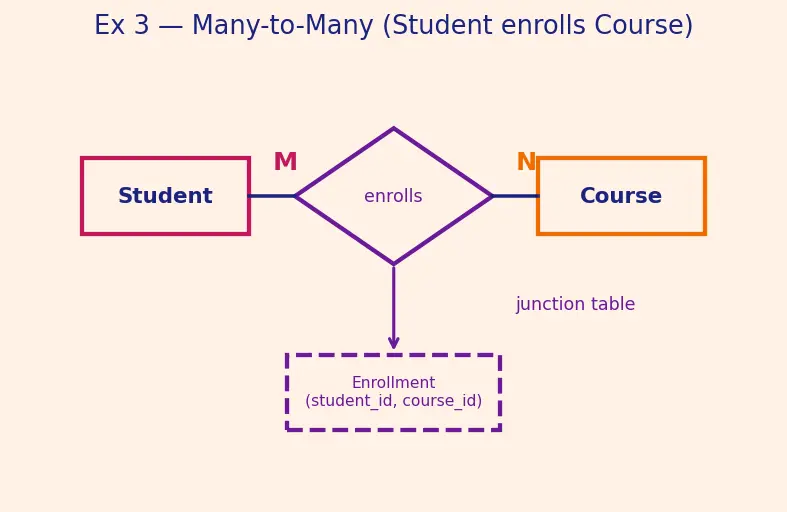
Mark both edges as M and N. Diamond enrolls.
Why this step? Both "many" means neither side can host a single-value FK — both would need lists. That signals a junction table.
Figure s03 (described): magenta Student and orange Course rectangles are joined by a violet enrolls diamond, with a bold M on the student edge and N on the course edge. Below the diamond a dashed violet box labelled Enrollment (student_id, course_id) is connected upward by an arrow — the visual of "externalising the relationship into its own junction table."
Externalise the relationship into its own table.
Why this step? A relationship instance is a pair(student,course). If neither entity can store the pair, we give the pair its own home.
Write it with a composite key.Enrollment(student_id FK, course_id FK, PRIMARY KEY(student_id, course_id))Why this step? The pair together is unique (a student can't enrol in the same course twice), so both columns together form the primary key. See Primary keys and Foreign keys.
Verify: student 7 in courses A and B → rows (7,A),(7,B); course A with students 7 and 9 → (7,A),(9,A). Many-on-both realised with zero list-cells. ✔
Forecast: write down three numbers before reading. Which regime gives the biggest?
M:N — every pair allowed. (A = the 4-element set, B = the 5-element set.)
Why this step? A relationship instance is any pair (a,b) with a∈A,b∈B. Cardinality places no restriction, so by the rule of product each of the ∣A∣=4 choices of a pairs with each of the ∣B∣=5 choices of b:
Rmax=∣A∣×∣B∣=4×5=20.
1:N (one A → many B) — the "many" side restricts reuse. (B is still the 5-element set.)
Why this step? Now each b∈B (the many side) has exactly one partner a, so each b contributes exactly one pair, and no more. The total number of pairs therefore equals the number of participating B's, capped at ∣B∣ — not∣A∣×∣B∣, because the "one" side cannot be reused freely.
Rmax=∣B∣=5.
1:1 — both sides used at most once.Why this step? Each element of either set appears in at most one pair, so we pair off until the smaller set is exhausted (same argument as Ex 1's derivation).
Rmax=min(∣A∣,∣B∣)=min(4,5)=4.
Verify:20≥5≥4 — tighter cardinality ⇒ fewer pairs, exactly as intuition predicts. See Cardinality and JOIN behaviour for how these bounds shape join result sizes. ✔
Forecast: which side gets the double line? Does a loan-less customer disappear from an inner join?
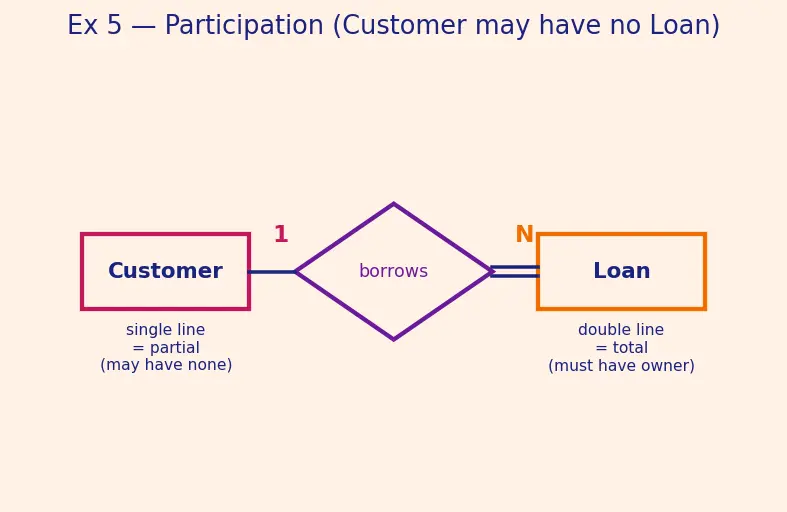
Assign participation lines. Double line Loan—diamond (total: every loan needs an owner); single line Customer—diamond (partial: a customer may have none).
Why this step? Participation is the minimum (0 or 1), a different axis from cardinality (the maximum). Here it's 1:N and partial-on-Customer.
Figure s04 (described): magenta Customer on the left, orange Loan on the right, violet borrows diamond between. The edge from Customer is a single line (partial: "may have none"); the edge to Loan is a double line (total: "must have owner"). Bold 1 on the customer edge, N on the loan edge. Two captions contrast single-line = partial vs double-line = total.
Tables.Loan(loan_id PK, cust_id FK NOT NULL) — NOT NULL encodes total participation of Loan.
Why this step? Total participation = "must have a partner" = the FK can never be NULL. Partial participation on Customer needs no constraint — absence is allowed.
Trace the degenerate row. Customer 42 has zero loans. An INNER JOIN Customer ⋈ Loan on cust_iddrops customer 42 (no matching loan row).
Why this step? This is the zero-input edge case: a partial-participation instance can vanish from inner joins. A LEFT JOIN keeps customer 42 with NULL loan fields.
Verify:NOT NULL on Loan.cust_id blocks an ownerless loan (total participation enforced). Customer 42 survives a LEFT JOIN, vanishes in an INNER JOIN — participation observed. ✔
Forecast: how many tables? Where does the FK point?
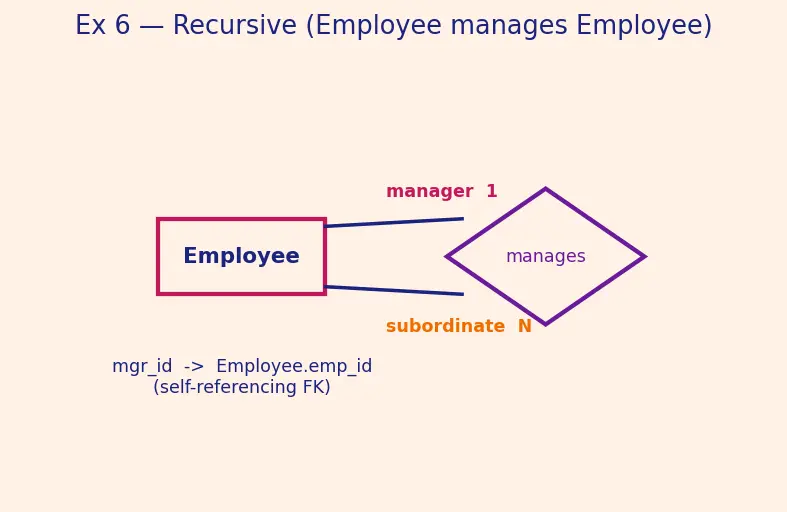
Draw the loop. One rectangle Employee, a diamond manages, with two edges going back to the same rectangle — labelled manager (1) and subordinate (N). Role labels are mandatory here.
Why this step? Both ends are the same entity set, so we must name the roles to tell the two ends apart; without labels the diagram is ambiguous.
Figure s05 (described): a single magenta Employee rectangle with two lines running to one violet manages diamond. The upper line is tagged manager 1, the lower line subordinate N — the same box plays both roles, which is why the role names are essential. A caption reads mgr_id -> Employee.emp_id (self-referencing FK).
It's still 1:N, so FK goes on the many side — which is Employee itself.
Why this step? Each employee (subordinate) has one manager → one column suffices. The FK is a self-referencing column.
Write it.Employee(emp_id PK, mgr_id FK→Employee.emp_id)Why this step?mgr_id points back into the same table's primary key. The top boss has mgr_id = NULL (partial participation on the manager side — the CEO has no manager).
Verify: employee 3 managed by 1, employee 5 managed by 3, employee 1 (CEO) has mgr_id = NULL. Chain 5 → 3 → 1 → NULL terminates cleanly. Single table, self-FK. ✔
Forecast: double ellipse or single? What table does it become?
Classify the attribute.skills can hold many values → multivalued → drawn as a double ellipse.
Why this step? The double-ellipse shape is the visual flag that a single column will not do.
Reject the comma trick. Storing "Java,SQL" in one cell breaks 1NF: you can't WHERE skill = 'SQL' reliably, can't index it, can't count skills.
Why this step? Atomic-cell requirement of 1NF (see Normalization — 1NF, 2NF, 3NF) is exactly what a packed string violates.
Promote it to its own table.EmployeeSkill(emp_id FK, skill, PRIMARY KEY(emp_id, skill))Why this step? Each (employee, skill) pair becomes one row — atomic, searchable, joinable. This is structurally the same junction-table move as M:N.
Verify: employee 2 with skills Java, SQL → rows (2,'Java'),(2,'SQL'). Query WHERE skill='SQL' finds employee 2 in one indexed lookup. ✔
Forecast: how many junction tables appear? Where does due_date live, and what identifies a borrowing?
Extract nouns → entities.Book, Author, Member.
Why this step? "Noun you'd make a table for" → rectangle. title and due_date are not things — hold them for now.
Extract facts → attributes.title(Book), name(Author, Member). due_date is a fact about a borrowing event, not about a book or a member alone.
Why this step?due_date depends on both who borrowed and which copy — that's a hint it belongs on the relationship, not an entity.
Extract verbs → relationships + cardinalities.
Book — written_by — Author: M:N (a book has many authors; an author writes many books).
Member — borrows — Book: M:N (over time, many-to-many).
Why this step? Both verbs give many-on-both, so both become junction tables.
Give the borrowing event its own key. A member can borrow the same book more than once, so the pair (member_id, book_id) is not unique, and due_date is a value, not a reliable identifier (two borrowings could share a due date). We therefore introduce a surrogate keyborrow_id.
Why this step? A borrowing is an event — a thing that happens at a moment — so it deserves its own stable identifier rather than being pinned to attributes that can repeat or collide. See Primary keys and Foreign keys on surrogate keys.
Tables.Book(book_id PK, title)Author(author_id PK, name)Member(member_id PK, name)Wrote(book_id FK, author_id FK, PK(book_id,author_id))Borrow(borrow_id PK, member_id FK, book_id FK, borrow_date, due_date)Why this step?Wrote is a pure link, so its composite key (book_id, author_id) fits. Borrow is an event table: its own borrow_id primary key lets the same member re-borrow the same book many times, each as a distinct row, with due_date and borrow_date as ordinary attributes of the event. See Database design lifecycle — conceptual to physical for this conceptual→physical hand-off.
Verify: book 1 by authors 10 and 11 → Wrote(1,10),(1,11). Member 5 borrows book 1 on two occasions → two Borrow rows with distinctborrow_id (say 100 and 101), even if both share a due date — the surrogate key keeps them apart. due_date never duplicated onto Book. ✔
Forecast: are cardinality and participation the same knob or two knobs?
State the two axes. Cardinality = maximum partners (how many). Participation = minimum (whether mandatory, 0 or 1). They are independent.
Why this step? The whole trick is realising these are orthogonal — the exam bait glues them together.
Judge the claim.False. A 1:N relationship can be partial: e.g. Department 1—N Employee where a brand-new department has zero employees (partial on Department) is perfectly legal.
Why this step? One counterexample kills a "must" claim.
Enumerate all four combinations (2×2=4, by the rule of product — 2 cardinality choices times 2 participation choices):
#
Cardinality
Participation
Worked example
1
1:1
total
Every Loan ↔ exactly one Account; a loan must have an account.
2
1:1
partial
Person—Passport; a person may have no passport.
3
1:N
total
Every Order has ≥1LineItem; an order must contain items.
4
1:N
partial
Department—Employee; a department may have zero employees.
Why this step? Listing all four proves the two knobs are independent: for each cardinality, both participation values are legal — nothing is ruled out.
Verify: the claim's counterexample (an empty department, 1:N yet partial) exists ⇒ the claim is false. The enumeration has exactly 2×2=4 rows. ✔
Forecast: does the junction table survive when one side is forced to 1?
Before (true M:N). Let A=Employee (6 instances) and B=Project (4 instances).
Why this step? Full rule-of-product bound when both sides are "many" — the same derivation as Ex 4's M:N regime:
Rmax=∣A∣×∣B∣=6×4=24.
After (employee → at most 1 project). The relationship collapses to 1:N (one project, many employees). Now each employee (the many side) contributes exactly one pair:
Why this step? Forcing the max on the Employee side down to 1 is exactly the 1:N restriction from Ex 4 — the "many" side (employees) now caps the count.
Rmax=∣Emp∣=6.
Structural consequence. We no longer need a junction table; put project_id FK directly on Employee.
Why this step? This is the limiting case where M:N degenerates into 1:N: as one side's maximum → 1, the external table dissolves into a single FK column. The junction table is only forced when both maxes exceed 1.
Verify:6×4=24 (M:N) shrinks to 6 (1:N) — a factor of ∣Proj∣=4 drop, matching "the one side removed a factor". Junction table becomes unnecessary. ✔